Linrad Rig Control across a LAN for any radio via N1MM
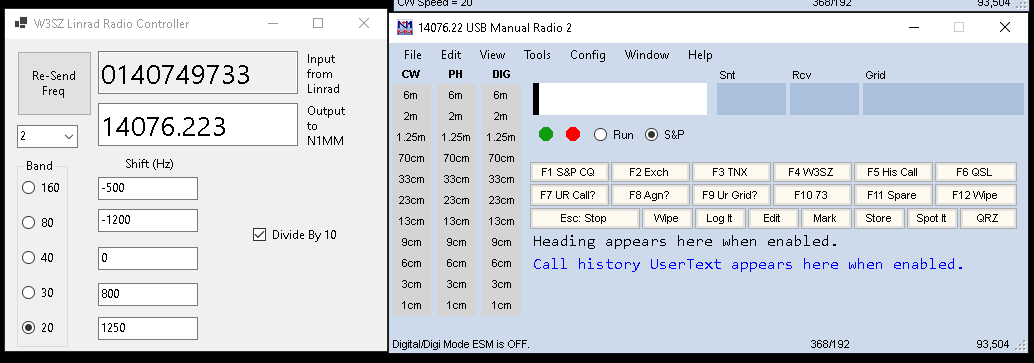
With this project you can run Linrad on one computer and control the frequency of a radio that is CAT-controlled by N1MM on another computer. You just need to compile and build Linrad64 using this wusers_hwaredriver_lin2n1mm.c file after renaming this file to wusers_hwaredriver.c, and to run the app located here on your N1MM computer.
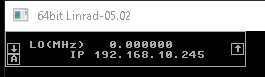
When a signal of interest is spotted on the Linrad bandscope, typing 'U' or 'Q' on the keyboard after left-clicking on that signal causes Linrad to send its frequency information over the network to the tcp server program on the N1MM computer. That program tells N1MM to tell the radio to go to the Linrad frequency of interest. If you are using a transverter, you can set the transverter offset in MHz in the user window that my code adds to Linrad. You also use this user window to set the IP address of your N1MM computer so that Linrad knows where to send the frequency to as you can see below:
After downloading the zip file for the C# app that runs on your N1MM computer you need to unzip it and then run the setup.exe file that it contains. As you can see in the image at the top of this page, the C# app allows you to set offsets for 5 bands, which were chosen to match the bands covered by SM5BSZ's excellent WSE hardware. You need to manually select the offset that you want to apply, using the radiobuttons to the left of the shift text boxes.
If you have any questions or comments, just let me know.
Copyright 1997-2025 COPYRIGHT Roger Rehr W3SZ. All Rights Reserved